Showing posts with label compare. Show all posts

Tuesday, December 22, 2009

Online savings review by mere-mortal

Recently I had a chance to review three online banks for personal savings: HSBC DirectAlly (ex GMAC) and Personal Savings from American Express.

I would not give you a comparison list like the most money  saving sites do.  They are rarely useful for making a final decision.  I'll just cover the most important points for a regular customer, like myself.

General:
  • Both HSBC and Ally have a debit card attached to your account. (This is good.)
  • Both of them are subject to the federal rules for withdrawals from savings account.  Which is neither bad or good, it is just the way it is.  
  • Amex doesn't provide either debit card or checks for money withdrawals.  Online only.

Rate:
  • Ally gives a better rate than HSBC (1.50% v. 1.35% at the moment of writing this).
  • Ally has a history of rebranding that it tries to run away from. (Personally, I had no chance to work with GMAC before, so it doesn't make any difference for me.)
  • Amex is a pretty strong brand.  Not perfect though, like the most of banks.

Account setup:
  • Ally account setup is very quick.  Super quick.
  • HSBC is super slow on setting up account.  It includes both online and offline steps that can make you hate the idea of working with them somewhere in the middle of the process.
  • Amex supposed to be quick, but if they put you for manual processing (what happen to me) they are slow.  But better than HSBC anyways.

Verify an account:
  • Ally and Amex are pretty quick on verifying accounts.
  • HSBC is slow.

Transferring money:
  • HSBC is super slow on transferring money.  They disappear from your account next day, and travel somewhere for around 3 business days.  Than they show up at HSBC, but it still takes a day or so to become available.
  • Amex is doubtful.  The money disappear next day, and appear on the account the same day, but as "current balance".  "Available balance" stays zero.  According to customer support, they take full 5 business days to make the money posted as "available balance".  They say the money don't loose interest, because it's counted on the "current balance", however, I never double-checked them myself.  (They can probably lie.  This happens with banks.)
  • I don't have much experience with Ally yet.  I'll try that shortly.

That's it.  Feel free to drop me a line if you have any questions, I'd be happy to give you some insights and save you some time.

# Posted via email from opportunity__cost

Monday, March 30, 2009

Warming up with GMAT RC

Finally, after warming up a little bit (and staying away for different types of insect texts ;) I was able to score a tiny bit more then 82% of correct answers on my next block of Reading Comprehension texts.

So now it looks like it'd be the easiest part of manage, with some practice and just keeping up my English vocabulary.

I've already passed three types of questions (according to the first book of GMAT Review). They are Problem Solving (PS), Data Sufficiency (DS) and and Reading Comprehension (RC). To prioritize them, I'd write something like this:

RC < PS = DS

PS and DS are almost equal in hardness (for me), while RC is fairly easy one. Bear with me, and I'll compare more categories to those two.

Saturday, November 15, 2008

Considering new laptop

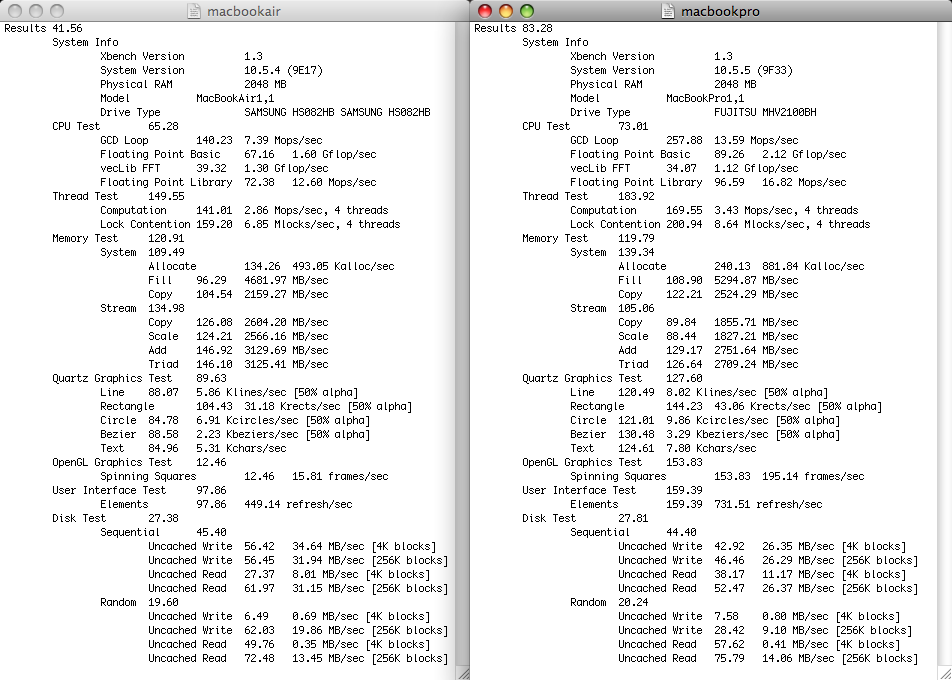
While considering new laptop, I run xbench on my almost 3 years old MacBook Pro against half a year old MacBook Air (the one that belongs to my wife). While a lot of people think that xbench can't be used as accurate comparison test for computers, something is better than nothing.

So here comes the data side-by-side.


As you can see, the overall score for MacBook Air is about 2 times less then for my MBP.

Going into details, the CPU scores are pretty close to each other. I don't know why but it could be that 1.6 Core2 Duo is running much alike 2.0 Core Duo. Memory test is also pretty much the same.

Graphics really sucks on MacBook Air. Especially, when it comes to OpenGL.

One of the biggest surprises was that disks are running pretty much the same, however, my MacBook Pro was supposed to be 5400rpm vs 4200rpm on MacBook Air.

Keeping in mind that market price for my MacBook Pro is about $1,000 off the craigslist, and one can grab a sealed first generation MacBook Air for as low as $1,150 (add taxes, AppleCare and other shit and it will grow upto $1,500), the price difference of $500 could be a good bargain for getting 3 years hassle-free laptop. However, you should be ready to depart with all-in-one laptop, loosing bigger 15.4" vs 13.3" screen (not a big issue for me though), Firewire port and integrated SuperDrive (that's basically all that I'm really using). The gain is lighter weight, slimmer and fancier toy. ;)

So does it really worth it? I don't know. I'm still looking for aftermarket few months old aluminium MacBook Pro's, which are priced around $1,800-1,900 off the craigslist (no taxes, but add extra $250 for AppleCare). The upgrade cost is raising two times up though.

I'm missing old good days having few more years on AppleCare and caring less about what I'm working on. ;)