Showing posts with label drive. Show all posts

Tuesday, December 30, 2008

Test drive: Toyota Prius + snow

I'm going to give my 2007 Toyota Prius a test drive. After numerous warnings about how tough can Prius be in snow, it makes it even more interesting.

There are some people complaining that Prius shutting down the engine when the traction control system believes that it's too slippery around. Well, driving Prius in California doesn't give you too many chances to try this out, unless you'll get into very heavy rain and will press the right pedal to the floor. (Which I did, by the way. It didn't kill the engine for me, but dropped the impact of the accelration a lot.)

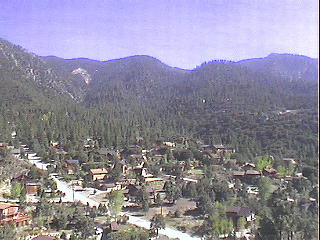
I'm heading north to Pine Mountain Club, CA. It's not the very snowy place (webcam), but I think that we're going to meet the snow this year. (While we didn't see any last year, but the year before I got stuck on 2003 Mitsubishi Outlander there.)

I am driving for about 10 years, the most time (except the last 3 years) I used to drive in places, where one can see snow for at least 2 months in a year (sometimes more, sometimes less). I used to drive all types of cars, either front wheel or rear wear. The rear ones can be really tough in snow for inexperienced person, especially in the time when they require extreme caution. (And they still sometimes a headache for me.) The front wheel driven cars are a little bit more intuitive, but can be as much dangerous as other ones.

So this is not the first time I'm challenging snow, but it's for the first time I'm going to drive the car with traction control (especially, with so many complains!). I'm pretty sure it's going to be a lot of fun, excluding the areas which are too narrow for even two cars at the same time. ;)

P.S. And definitely I'm going to carry the pair of snow cables in the back. I didn't get the fancy (SC Super Z6), but the basic ones (SC Radial). The 4x price difference scared me, but I'm going to reconsider this, as soon as I'll start visiting snow places more often.

Friday, May 23, 2008

Portable drive iomega 120G and MacBook Pro

This is my review of Iomega Portable Hard Drive, FireWire 400/USB 2.0, 120GB Silver - 33634 on Apple MacBook Pro laptop. I'm not a hardware geek, so don't suppose this review to be very accurate from the technology stand-point. I'm a regular end-user and I just want to be happy with my gadgets. ;)

Starting from the unboxing.

Pretty nice device, pleasant for touch, pretty slim and narrow.

Has a reset button, can be switched into three power modes (USB/Firewire, Off ;) or 5V DC).

I found Firewire cable to be pretty short and nice. I remember people complaining about the length of the cable and found it to be too long. Well, not in my case. ;)

After connecting the device to the port it was found immediately. I've started the transfer of 10G folder with numerous files and Finder estimated it to about 11 or 12 minutes. However, it gave me more then 2 hours on 60G folder with about 50K of files in it. Although this is very rough and (I guess) very inaccurate, it's still much better comparing to my experiment with WD. I also tried to transfer 744M in one file and I got 9.3MB/s average. And on 4G file it gave me 15MB/s, so it speeds up a little bit. Again, I do not know if this cool or not, but it works for me well.

When I clicked on cancel, the transfer immediately stopped. I don't know if there is an issue or not, but I remember having hard time with different external drives that made Finder's copy stall for hours after canceling the action.

Overall, I'm pretty satisfied with the device, but it'll take me some time to drive it crazy and to discover its fool-tolerance. ;)

P.S. Just found out that the device came in FAT32 and it can't accept single files more then 4G in size. I have got a few Parallels images about 8G long and I can't put them on the device.

Thursday, May 22, 2008

OCMT CHP/MSF course

Yesterday I registered for O.C.M.T. FBRC-0613-08B course in Anaheim, CA. I'll be busy during the Friday 6/13 for theory and all weekend "mastering the riding skills". ;) Well, it's almost a 40 miles drive from my home, however, it's the earliest one in my area. All others are more then two weeks later from this course or even ending up late in July.

Actually, I was pretty surprised to see that Basic Riders Course (BRC) is booked up toughly for a month in advance (almost everywhere!).

What is BRC?

The Basic RiderCourse is a three-day course taught by RiderCoaches certified by the Motorcycle Safety Foundation (MSF) using curriculum developed by MSF. Upon successful completion of the Basic RiderCourse, students are given a Certificate of Completion of Motorcycle Training (DL389). The motorcycle riding test given by the DMV may be waived with this certification and graduates may also qualify for insurance premium discounts with some motorcycle insurers.

RiderCoaches will start you off with straight-line riding, turning, shifting and stopping. You'll gradually progress to cornering, swerving and emergency braking. In the classroom you'll learn about the different types of motorcycles, their characteristics, and how they operate. The RiderCoaches, all experienced motorcyclists, will advise you on what to wear for comfort, visibility and protection. You'll find out how alcohol and other drugs affect your ability to ride safely. A very important segment of the course will show you how to create your own strategy for riding in traffic, and how to deal with critical situations. The course concludes with a knowledge test and skill evaluation.

Why do I need it?

I'd like to get a) skills for handling bike safely (helpful), and b) get the rid of DMV behind-the-wheel test. I had one when I was getting my Class C (usual car) driving license, and, damn, I don't want it to happen again.

Saturday, May 17, 2008

Portable drives for Mac

I've been looking for a nice portable external drive for my MacBook Pro. It's one of the first editions with the 2.0Ghz, two USB 2.0 and one Firewire 400 on-board. It's got about 90G HDD and I don't feel comfortable anymore with more then 30G of photos and music now. What's even worse is that I need to visit AppleCare as soon as possible for some issues that I experience with it, and my gut feeling is that I'm going to leave my laptop for repair. As you know, the data gets lost in such cases. ;)

My first try with portable drives was Maxtor (that I received as a present). I don't remember the exact model, but it had only USB Y-cable (one plug to drive, two plugs to laptop: one for data and power, another one for power only). It didn't work very well. It requires both USBs to be taken to get enough bus power. And this doesn't sound okay for me. I still have my Canon camera, numerour memory sticks and (!!) iPhone to be plugged somewhere and I hate the idea turning my workspace into wired nightmare with USB hubs all around.

My next try was Western Digital My Passport 160G portable USB drive (WDME1600TN). This little toy was looking pretty nice, I got it for $94.99 in Circuit City (some clearance item), and, guess what?.. it worked fine. I mean, it was okay with having just single USB. Unfortunately, it worked out to be pretty slow, and my Finder estimated 25G folder transfer to take more then 5 hours (wow!). I don't know if this is okay for a USB 2.0 complaint devices, but this is not okay with me.

I was almost sold to Verbatim Smartdisk 120G portable USB drive (item #96534), available on sale for $49.99 at Memory Depot (and shipping free with code FREESHIP). However, I have found some reviews saying that the whole Verbatim Smartdisk line doesn't work well with Mac laptops, as far as they produce low power on USB. I decided not to try it.

So, my next shot is Iomega Portable Hard Drive with both Firewire 400 and USB 2.0 ports, 120GB. I ordered it a few minutes ago on Amazon for $79.99 with free shipping and no tax (yet ;). I found some positive reviews for it saying that it might be a good choice for Mac laptops. Hopefully, it is. We'll see. While it might be as slow as the WD one, it's cheaper. ;)